Traveling to a new country can be exciting, but language barriers often make simple tasks feel complicated. Imagine ordering food, asking for directions, or making friends without worrying about misunderstandings.
That’s where the best translation app for travel comes in. It turns your phone into a powerful tool that helps you communicate easily and confidently, no matter where you are. Ready to discover which app will make your trip smoother and more enjoyable?
Keep reading to find out!
Why You Need A Translation App
Traveling to new countries brings excitement and challenges. One big challenge is the language barrier. A translation app helps you speak and understand local languages easily. It makes your trip smoother and more enjoyable. You can ask for directions, order food, and meet new people without stress.
Benefits For Travelers
A translation app saves time and reduces confusion. It helps you avoid misunderstandings in shops, hotels, and transport. You feel more confident exploring new places alone. The app also keeps you safe by helping with emergency communication. It turns language barriers into simple conversations.
Common Language Barriers
Many travelers face difficulty reading signs or menus in foreign languages. Pronouncing words correctly can be tough. Locals may speak fast or use slang. These barriers make everyday tasks hard. Without help, travelers might miss important information or feel isolated. A translation app bridges this gap instantly.
Features That Matter
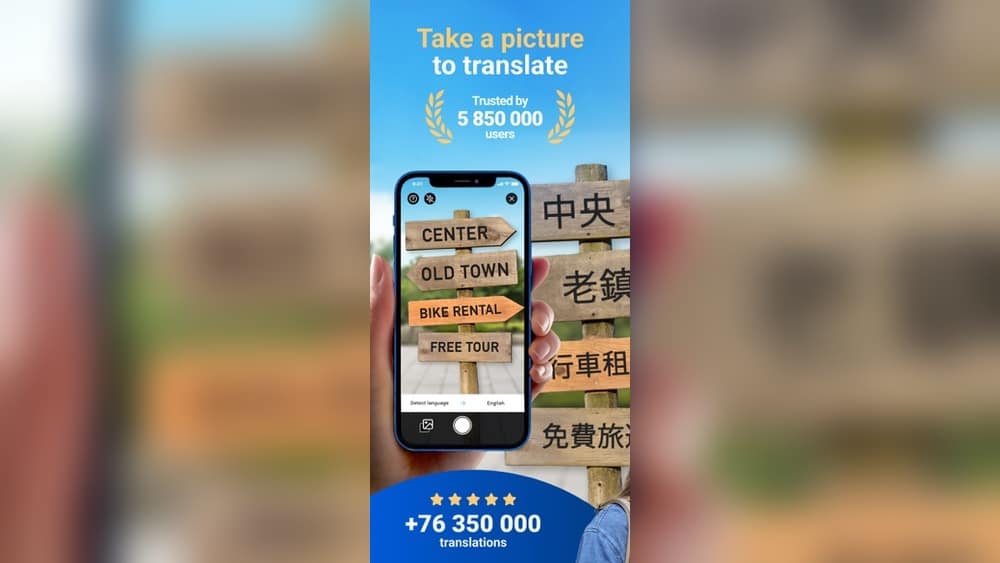
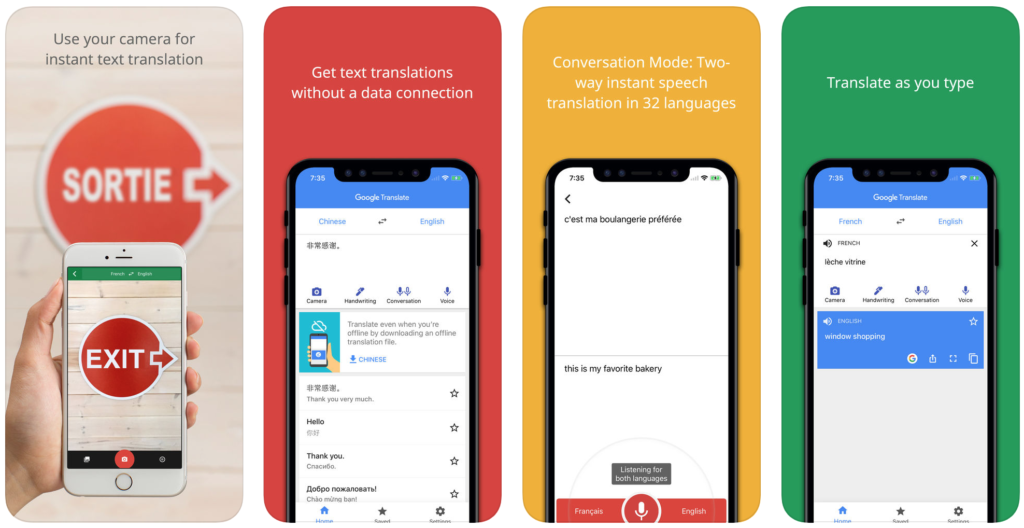
Look for apps with voice recognition to speak naturally. Offline mode is useful where internet is weak. Text translation helps with written signs or menus. Camera translation reads text from pictures quickly. Easy interface means less time learning the app. These features make travel communication easier and faster.

Credit: apps.apple.com
Top Translation Apps For Travel
Traveling to new places often means facing language barriers. Translation apps help travelers understand signs, menus, and conversations. They make travel smoother and more enjoyable. Here are some top translation apps that work well for travel.
Google Translate
Google Translate supports over 100 languages. It works offline with downloaded languages. The app offers text, voice, and camera translation. Users can point their camera at signs for instant translation. It is simple and fast to use.
Microsoft Translator
Microsoft Translator supports more than 60 languages. It provides text and voice translation. Group conversations can be translated in real time. The app works offline after downloading languages. It is reliable and user-friendly.
Itranslate
iTranslate offers translations in over 100 languages. It features voice-to-voice conversations. The app includes a phrasebook with common travel phrases. Offline mode works with downloaded languages. It is easy to navigate and helpful for travelers.
Sayhi Translate
SayHi Translate supports many languages and dialects. It translates voice and text quickly. The app allows users to change the speaking speed. It is useful for clear communication. Simple design makes it good for beginners.
Triplingo
TripLingo focuses on travel-specific language needs. It offers phrasebooks, voice translation, and culture tips. The app helps with safety and etiquette abroad. It also includes offline translation features. It is a solid choice for travelers needing extra help.
Offline Translation Capabilities
Traveling often means visiting places with no internet access. Offline translation capabilities help solve this problem. They allow you to translate languages without needing a connection. This feature is a must for any travel translation app.
Offline mode works by downloading language packs. These packs store the words and phrases you may need. Once downloaded, you can use the app anywhere. No data or Wi-Fi required. This makes communication easier in remote areas or on the move.
Apps With Offline Mode
Several translation apps offer offline mode. Google Translate is popular and supports many languages offline. Microsoft Translator also provides offline packs for easy use. iTranslate and SayHi Translate allow offline translation too. Choose an app that fits your travel needs and language preferences.
How To Download Language Packs
Start by opening the translation app. Find the offline or language pack section. Select the languages you want to use offline. Download the packs before your trip. Keep an eye on your device storage space. Downloading early ensures smooth use during travel.
Pros And Cons Of Offline Use
Offline translation saves data and works without internet. It is fast and reliable during travel. But offline packs take up device space. Some languages may have limited phrases offline. Updates and improvements happen slower without internet. Still, offline mode is essential for many travelers.
Credit: www.free2move.com
Voice And Camera Translation Features
Voice and camera translation features make travel easier and more fun. They help you talk to locals and read signs or menus without stress. These tools save time and reduce confusion. Many apps now include these smart features for smooth communication.
Speech Recognition Accuracy
Good speech recognition picks up words clearly. It understands different accents and speeds. This helps avoid mistakes in translation. Apps with high accuracy let you speak naturally. They catch your words fast and give correct translations. This feature is key for quick conversations abroad.
Real-time Camera Translation
Camera translation reads text instantly from signs or menus. Just point your phone camera, and the app shows the translation. It works well for street signs, labels, and printed text. This feature is helpful in places with unfamiliar languages. It saves time and effort compared to typing text manually.
Best Apps For Hands-free Use
Hands-free apps let you use voice commands without touching your phone. Great for walking or carrying bags. These apps listen and translate while you stay active. They provide smooth, natural conversations on the go. Choose apps with easy voice controls for better travel experience.
User Experience And Interface
User experience and interface play a key role in choosing the best translation app for travel. A smooth and simple design helps travelers get quick translations. Clear menus and easy controls make the app usable for everyone. The interface should not be crowded or confusing. It must allow users to focus on translating words and phrases fast. Good design saves time and reduces stress in foreign places.
Ease Of Navigation
Easy navigation means moving through the app without problems. Buttons and icons should be clear and large enough. Menus need to be simple, with important features upfront. Users should find what they need in a few taps. Fast response times improve the app’s feel. A well-organized layout stops users from getting lost.
Customization Options
Customization allows users to adjust the app to their needs. Changing font size helps those with poor eyesight. Dark mode can make the screen easier to read at night. Users might want to save favorite phrases for quick access. Some apps let travelers select specific languages or dialects. These choices make the app more personal and helpful.
Accessibility Features
Accessibility features make the app usable for people with disabilities. Voice input lets users speak instead of typing. Text-to-speech reads translations aloud for better understanding. High contrast modes help users with vision problems. Simple language options assist those still learning English. These features ensure everyone can benefit from the app.
Cost And Subscription Models
Understanding the cost and subscription models of translation apps is important for travelers. It helps choose the best app without spending too much. Some apps offer free versions with basic features. Paid versions have more tools and options. Knowing what each plan offers saves money and improves your travel experience.
Free Vs Paid Features
Free versions usually include simple translation functions. You can translate short texts or phrases. Some apps limit the number of translations per day. Paid versions provide unlimited translations. They also offer offline use and voice translation. Extra languages and better accuracy often come with paid plans. Free features are good for casual travelers. Paid features suit frequent or long trips.
Subscription Plans
Most translation apps have monthly or yearly subscriptions. Monthly plans cost less but add up over time. Yearly plans offer a discount and save money. Some apps offer one-time purchases instead of subscriptions. Trial periods let users test the app before paying. Always check if the subscription auto-renews. Cancel anytime options give more control.
Value For Money
Paid apps give more convenience and advanced tools. Offline use saves data and works without internet. Voice translation helps with real-time conversations. The app’s ease of use is also important. Choose apps that fit your travel style. Compare features and prices carefully. Spending on a reliable app can reduce travel stress. It often proves worth the cost.
Tips For Choosing The Right App
Choosing the right translation app can make travel easier and more fun. The right app helps you talk to locals, read signs, and understand menus. Not all apps work the same. Some are better for certain languages or offline use. Think about what you need before picking an app.
Assessing Travel Needs
Think about your trip. Which languages will you need? Will you use the app for speaking or reading? Some apps translate voice well, others focus on text. Check if you need offline access. Some places have no internet. Choose an app that fits your trip style.
Testing Before Your Trip
Try the app before you travel. Download it and test key features. Check if translations make sense. Practice speaking and listening. Make sure the app is easy to use. Testing saves time and stress during travel. It helps avoid surprises in a new country.
Combining Multiple Apps
No one app does everything perfectly. Use two or more apps to cover different needs. One app may work better for voice translation. Another may have better text or photo translation. Combining apps gives you more options. It helps solve different language challenges on your trip.

Credit: apps.apple.com
Frequently Asked Questions
What Is The Best Translation App For Travel?
The best translation app for travel offers accurate, real-time translations in multiple languages. It supports offline use and voice input. Popular options include Google Translate, iTranslate, and Microsoft Translator. These apps help travelers communicate easily and understand signs, menus, and conversations abroad.
How Do Translation Apps Work For Travelers?
Translation apps use AI and machine learning to convert text or speech between languages instantly. They utilize your phone’s camera, microphone, or keyboard input. Many apps also provide offline functionality, making them reliable in areas without internet access during travel.
Can Translation Apps Work Offline During Travel?
Yes, many top translation apps offer offline mode. Users can download language packs before traveling. This feature allows translation without internet, ideal for remote locations or avoiding roaming charges. Offline support ensures continuous communication even without connectivity.
Are Translation Apps Accurate For Travel Conversations?
Translation apps provide good accuracy for common phrases and simple conversations. However, nuances and slang may sometimes be mistranslated. For critical communication, double-check translations or use apps with human translator services. Overall, they significantly improve travel language barriers.
Conclusion
Choosing the best translation app makes travel easier and more fun. These apps help you speak and understand many languages. You can read signs, order food, and ask for help quickly. Most work offline, saving your data and time. Try different apps to find what fits your needs best.
A good app keeps your trip smooth and stress-free. Travel with confidence and enjoy every moment. Simple tools can make big differences in new places. Start exploring without language worries today.